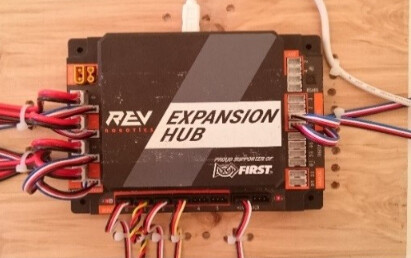
I was an event on Saturday, our robot died in the middle of the match thank goodness we had enough points. We do have an ESD cable by rev on the robot. I download the logs where do I send it to figure out what happen. The funny thing 3 other robots did the same on the field.. I am in my third year and trying to figure out what is going on.,.
I don’t immediately see anything suspect in your logs except for incessant spamming of a failure to a call of getRobotOrientationAsQuaternion(). You might want to either try to root cause that, or take it out of your software entirely.
One thing you can to do help narrow where in the logs an anomaly might occur is to use the match logging feature.
Go to Settings on the Driver Station, scroll to the bottom and turn on Match Logging. Once you do that there will be a Match Number text input at the top of the Driver Station. Click it, enter the match number you are playing and the log output for just that OpMode run will be saved to a file tagged with the match number.
You can see this in your existing logs.
01-24 13:27:15.887  1004  1169 I RobotCore: ******************** STOP - OPMODE /storage/emulated/0/FIRST/matchlogs/Match-0-FinalRedSideWall:_Yay.txt ********************
01-24 13:27:15.894  1004  1215 I RobotCore: saving match logcat to /storage/emulated/0/FIRST/matchlogs/Match-0-FinalRedSideWall:_Yay.txt
Although it you don’t have Match Logging turned on, it overwrites the file each time you run the OpMode.
If you haven’t run the same OpMode since the failure happened, you may still have that file. You could look for it in /sdcard/FIRST/matchlogs. The format of the filename, as you can see from the example above is Match--.txt.
Otherwise I would suggest turning on Match Logging and if it happens again, copy that specific match log off the Control Hub.
I am looking at a particular match either 4 or 5 for this past weekend the robot is connected for a few seconds and didn’t let us move. Files are uploaded and shared..
This is way above my paygrade… I just turned on the match logging turned on.
We do not have an SD card on the robot ? Driver station or Control hub?
The incessant spamming of a failure to a call of getRobotOrientationAsQuaternion(). is that my IMU?
If so I will have the programmer disable that feature…we do get the imu settings on the DS screen.
The Quaternion message isn’t something you can disable. When that message is spammed during a match, which your log files show, that means your robot’s IMU got hit by ESD or EMI that caused the IMU inside the Control Hub (you have a newer Control Hub with a BHI260AP IMU) to reset unexpectedly. This really just points out that you likely have strong ESD issues that you may need to work out on the robot.
Have you followed all of the ESD mitigation steps called out in this document?
There is an embedded sdcard, soldered to the board, inside the Control Hub. And it is mounted at /sdcard, which is why the path is as it is. This is where all Robot Controller related data, including the logs, are saved.
I wasn’t suggesting they disable the message. I realize that the warning is output to the log from SDK internals. However the call to getRobotOrientationAsQuaternion() is a public API method, which they must be using in their OpMode?
My suggestion was to try to root cause why that call is failing, or remove it entirely.
I will agree that it smells like an ESD problem though and if they are using that method, and they see that error message, that would be the first thing I’d focus on.
After 15 matches it was the first time this season it occured.. Thanks for the advise…
The REV Resistive Grounding Strap (REV-31-1269) is an approved grounding cable. we have that cable.
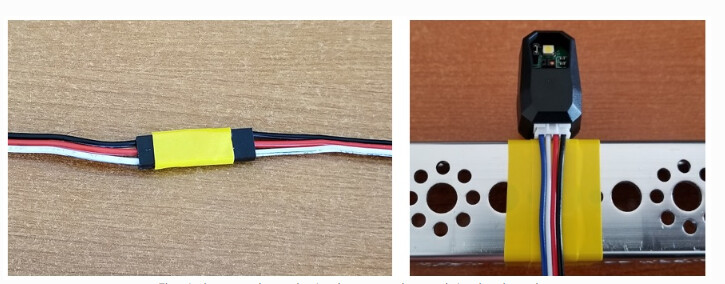
I am going to redo many parts using tape as indicated in the picture.
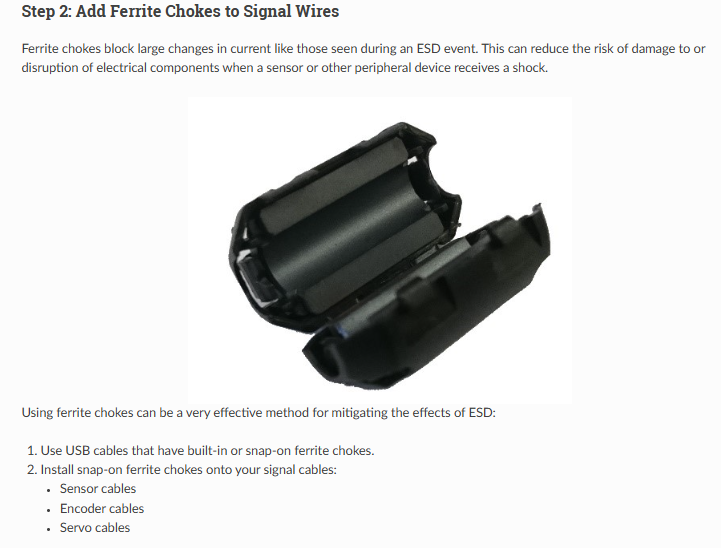
Just as an FYI, Clip-on Ferrites really only make sense prophylactically (i.e. “as a preventative measure”) for any USB cables and/or the RS485 cable. Generally we shouldn’t use ferrites on other types of sensor cables unless we absolutely know there are signal integrity or unavoidable ESD shock issues. The best bet is to insulate your robot electronics from the frame/chassis, including sensors and the ends of cables. The grounding strap is just a way to prevent the chassis of the robot from being an immediate route for shocking/arcing ESD into your electronics, and to provide some measure of defense against rising charge levels on the field. It does not, however, protect your robot from higher-charged-objects on the field coming in contact with your robot and arcing into your electronics. Therefore, be careful to not have your electronics (including cameras!) near the edges of your robot or anywhere other robot components could touch.
Thank you for the valuable insight…
We are in our third competitive year our goal is to get to state with our modified starter bot…
I think it is a sign of the true iterative process, taking their design and looking for ways to maximize it..
Our goal is to continue to learn, grow and share with others..
At the moment we have been and defended 1st place in our league for three consecutive events.
Thank you
Team # 22266 small size team… started at 7, now we are 3 dedicated core members…lucky sometimes with the 4th one